
New Delhi, India — June 16, 2026 — Have you ever spent hours manually reviewing thousands of photos from an event or portrait shoot to find the selects your clients will love? Redrawn a roto mask from scratch because the footage moved? Taken the perfect street portrait only to notice the shop window reflection cutting right across […]
New Delhi, India — June 16, 2026 — Have you ever spent hours manually reviewing thousands of photos from an event or portrait shoot to find the selects your clients will love? Redrawn a roto mask from scratch because the footage moved? Taken the perfect street portrait only to notice the shop window reflection cutting right across your subject’s face? Every creative project has moments that are essential and moments that are simply necessary, and every minute spent on the latter is time away from the work that matters most to you.
Today we’re sharing new features and upgrades designed to remove that friction and keep you in creative control, so you can get back to your craft.
Let’s dive into what’s new this week:
Faster culling, motion editing, and sharper results in Lightroom
We are evolving Lightroom into your complete photography workflow hub experience where you can organize, enhance, and edit your photos, all without leaving the app. Today’s updates make every stage of your process faster and more powerful:
From the timeline to the audio track, Premiere’s latest updates are built around how editors actually work
You now have faster AI masking, new effects, smarter audio controls, and tighter connections to Stock and Firefly, all without pulling you out of the timeline:
Latest tools in After Effects make complex motion work faster, smarter and more connected
From rotoscoping to 3D rendering to vector workflows, After Effects’ latest updates remove the tedious work that creates friction and slows down your creative process:
More control with image editing in Photoshop
Photoshop’s latest updates give you more precise control over cleanup and reflection removal:
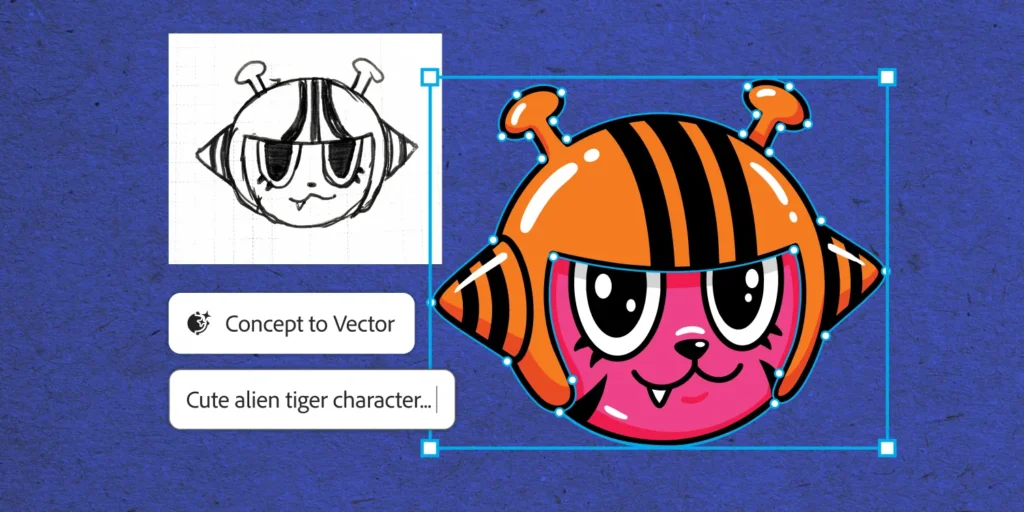
Illustrator’s newest tool removes the friction between a rough concept and a finished vector
We know designers want tools that remove friction and speed up tedious workflows, without sacrificing creative control.
We recently introduced the new Concept to Vector feature in Illustrator to help professional designers move faster from rough concepts to usable work. Concept to Vector turns sketches or low-quality assets into clean, editable vector drafts, or can generate multiple stylistic variations from a single sketch or source image — directly within Illustrator.
Explore what’s new and let us know what you think
The latest Creative Cloud updates are rolling out this week. Together these bring you more creative control with less friction. Explore what’s new and tell us what you think
The weekly read on where technology is heading — 75,000+ subscribers across the industry.
Questions about our reports, dashboards, InsightsPro or a custom engagement? Send a note and the team will get back to you.